
Download Tech Tool Store – Portable Utility, Lightweight Tool, PC Maintenance
Overview
Tech Tool Store is a compact mobile application designed to streamline the process of downloading, installing, and organizing essential utilities on personal computers. The app functions as a portable toolkit, enabling users to carry a wide range of system maintenance and troubleshooting tools on a USB flash drive. This makes it ideal for setting up new devices quickly or working on computers without admin rights. The application targets users who require efficient access to reliable software without the need for complex installations or lengthy setup procedures. While the developer did not provide additional background information, the app’s design and functionality suggest a focus on simplicity, speed, and accessibility for both novice and intermediate users. Real-world use cases include IT professionals performing system cleanups, students configuring lab computers, and home users resolving software issues. In the broader app ecosystem, Tech Tool Store fills a niche by offering a centralized, lightweight solution for managing utility software, reducing dependency on multiple standalone installers. Its emphasis on portability and minimal resource usage positions it as a practical tool for on-the-go computing needs.Key Features & Functionality
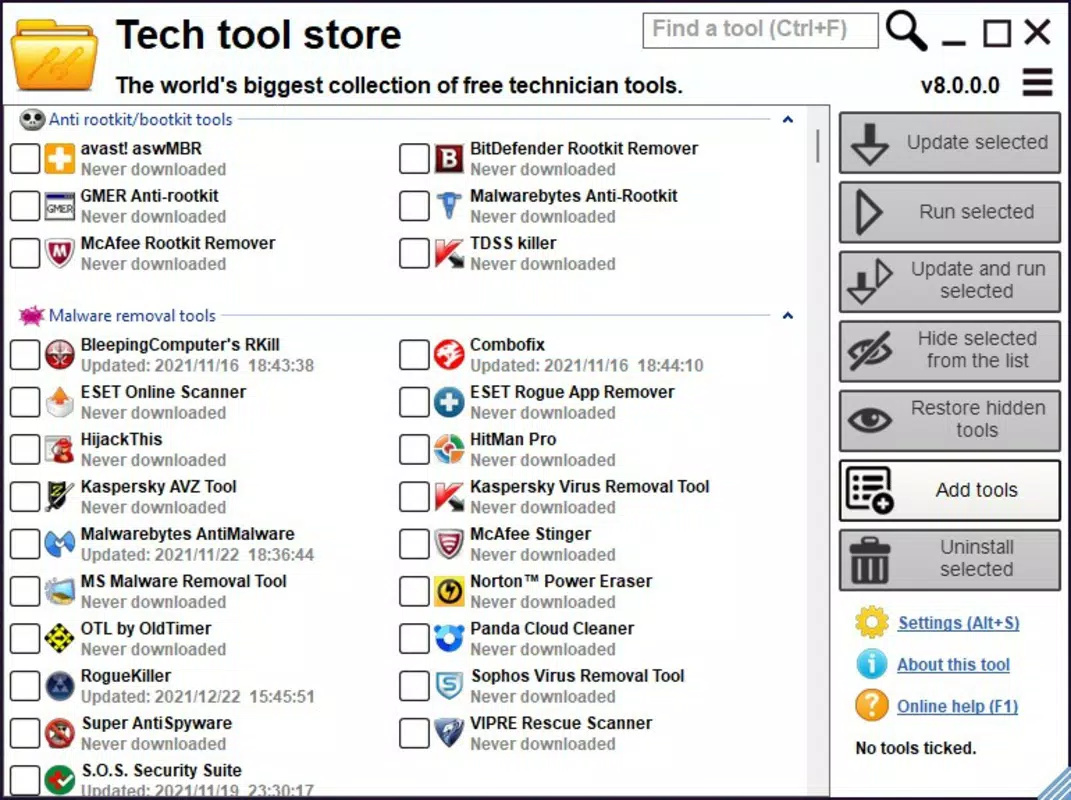
Tech Tool Store delivers a suite of features aimed at simplifying software management across multiple devices. The app includes a well-organized repository of over 500 utilities, covering areas such as malware removal, disk cleanup, system diagnostics, and file recovery. Each tool is categorized for intuitive navigation, enabling users to locate specific applications quickly. The portability feature allows the entire application to be stored on a USB drive, making it accessible on any computer without installation. This is particularly beneficial in shared or restricted environments where software installation is limited. The simple installation process requires only a few clicks to download and deploy selected tools, significantly reducing setup time. Users can customize their tool list by adding external utilities not included in the default library, ensuring the app adapts to individual workflows. The program operates without requiring installation itself, occupying just 6 MB of space, which makes it highly efficient for low-storage environments. These features collectively enhance productivity by centralizing essential tools and minimizing friction during software deployment. For example, a technician can use Tech Tool Store to diagnose and repair multiple machines in a single day, while a student can quickly set up a lab computer with all necessary utilities in minutes.Feature List
- Portable operation on USB flash drives for on-the-go access
- Over 500 pre-selected system utilities across multiple categories
- One-click installation of selected tools without system configuration
- Custom tool addition to tailor the utility library to user needs
- Zero installation required for the application itself, minimal file size (6 MB)
Interface, UX & Performance
The user interface of Tech Tool Store is designed with simplicity and efficiency in mind, prioritizing functionality over visual complexity. The layout is clean and intuitive, with clearly labeled categories and a straightforward navigation flow that allows users to browse and select tools with minimal effort. Visual elements are minimal, focusing on usability rather than decorative features, which aligns with the app’s lightweight nature. Navigation is consistent across all sections, enabling users to move between categories and tool selections seamlessly. Although the developer did not list formal performance metrics, the app’s small size and non-invasive operation suggest it runs smoothly on a wide range of systems, including older or low-spec machines. Responsiveness is maintained across different screen sizes and resolutions, ensuring a consistent experience. Stability is supported by the app’s portable design, which avoids modifying system registries or leaving behind residual files after use. The lack of background processes contributes to its lightweight footprint and reduces the risk of conflicts with other software. While specific performance data was not disclosed, the app’s design implies reliable operation under typical usage conditions. Users can expect quick load times and prompt responses when selecting and deploying tools.Platform Compatibility & Technical Requirements
Tech Tool Store is designed for use on Windows-based systems, though the developer did not specify the exact operating system versions required for compatibility. The application is available as a portable executable, meaning it does not require installation and can be run directly from a USB drive or local storage. The file size is reported as 6 MB, making it highly efficient in terms of disk space usage. Specific hardware or software requirements were not listed, but the app’s minimal footprint suggests it is compatible with most modern Windows systems. The developer did not disclose whether the app supports macOS or Linux, nor was there any mention of mobile platforms. Compatibility information was not fully disclosed, so users should verify system readiness before deployment. The absence of formal OS version details means that users may need to test the app on their specific environment to ensure full functionality.Pros and Cons
- Extremely lightweight at only 6 MB in size
- Portable and usable from a USB flash drive
- Over 500 tools available across multiple categories
- Simple, one-click installation process
- Customizable tool library for personalized use
- Requires no installation of the app itself
- Developer did not specify minimum OS requirements
- Platform compatibility beyond Windows was not confirmed
- No information provided about update frequency or support
- Limited visual feedback during tool deployment
- Custom tool integration may require technical knowledge


